Stop PC Crashes with WinZip System Utilities

Enter your email address:

Showing posts with label SEARCH ENGINE OPTIMIZATION. Show all posts

Monday, August 15, 2011

AUTOMATIC UPDATE SOCIAL NETWORKING SITES USING GOOGLE PLUS LINKS

Are you surprising, hearing that I am going to explain how to update your all social networking platforms using Google Plus. This is one of the most simple way to update your Facebook, Twitter, Digg and all other social networking accounts with the new post you have just blogged. But before doing that, you need an account in Posterous or ping.fm. Let me explain how can you do with Posterous or ping.fm

GOOGLE PLUS LINK UPDATION

  1. Create an account with Posterous or ping.fm
  2. Add most of the social networking allowed for auto post in Posterous or ping.fm
  3. Assign posting through Email. While creating the account, you will get a special Email address in Posterous or ping.fm
  4. Now login to your Google Plus account
  5. Create a new “Circle” and add the above Email address of your Posterous or Ping.fm account, to which you are allowed to send posts by Email.
  6. Now copy the link of your new post. Share it to this “Circle”. That’s all. Done.

What happens exactly when you share with Google plus circle

When you share with that circle, it will automatically send Email to your Posterous or ping.fm address, where autopost will happen to all your social networking sites linked with that account.

Nice Search Engine Optimization or Social Networking Optimization.

Quick, easy, isn't it?

More to Read:

Sunday, June 19, 2011

WEBSITE CONVERSION ANALYSIS

Let’s first get some definitions out of the way. A website conversion can be defined as a website visitor performing a desired action. Now, conversion rate, per se, is the percentage of visitors who take such a desired action. For purposes of this article I will designate two distinct types of website conversions. Level one conversions or “revenue conversions” and level two conversions or “rain check conversions.” Revenue conversions are actions that are designated as the final goal of the website creators. Revenue conversions turn visitors into clients or customers. Rain check conversions, on the other hand, are actions that are used to facilitate a revenue conversion sometime in the future. A revenue conversion in its most common form is known as a simple sale that translates into an online transaction. Familiar rain check conversions include newsletter opt-ins, form submissions, membership sign-ups, catalog requests, e-mails to customer service, or a call to your awaiting sales department. If nurtured correctly these rain check conversions germinate into full fledge revenue conversions at a later date.

WEBSITE CONVERSION SECRETS

Understanding Your Business and Optimal Visitor Actions

Clearly defining goals for your business is not enough to beat your evolving online competition. You must have clear objectives and an understanding of your customer for your internet presence to work for you effectively. Before hiring a web designer or database programmer to build your site, you must have a solid comprehension of what it is you want your website to do. More precisely, you must have an understanding of what you want your visitors to do within your site. Is your product too complex to offer a real-time e-commerce solution? If so, a phone call might be a better desired action. Are your products too inexpensive to warrant paying for a customer service department? If so, e-commerce may be the better choice. Are you receiving dozens of unqualified phone calls on your voicemail system? You might consider creating a form that both filters and qualifies potential customers. Are your buyers educated enough to fully understand what your service provides? A prominent phone number might help to attract clients to engage you over the phone. Is your target customer executive MBA students from The Wharton School of business? If so, you might want to write copy that speaks their language.

Off-Site Conversion Factors

The most common error in conversion analysis is neglecting factors not contained within the framework of your existing website. Off-site elements affect the quality of the traffic entering your website. All things held equal, a high quality visitor converts at a higher frequency than a low quality visitor. It is commonly held that surfers originating from a Google search are considered a higher quality visitor than your average web surfer. An individual clicking on an organic or natural search engine listing is also considered a higher quality visitor than one who clicks on a pay per click advertisement. A “direct access” visitor, one who simply types in your company url as the first step in the conversion process, or a returning visitor, typically also is considered a higher quality visitor. If someone knows you by name or actively decides to come back for a second visit, the odds of a desired action increase. To the contrary, visitors arriving to your site from affiliate programs, banner advertisements, e-mail campaigns, or blogs, are usually considered lower quality visitors as their actions are less reliable.

On-Site Conversion Factors

Usability is the term used to define the efficiency of a user interface. Websites are a form of interface where human beings interact with a host computer housing a particular website. Usability is important for us because it impacts conversion rate. Your website must be efficient. Visitors must be able to perform their tasks quickly. Long forms, excessive steps in an e-commerce order process, complex account creating protocol, or an extended webpage load time can bottleneck a visitor’s desired action. The action must also be easily understood the first time the visitor enters the website. You’ve got one chance and a brief stint of time to teach your visitors and limit frustration before they move to the next site. If you do happen to get a return visitor, can they remember how to navigate the site the second time around? Your interface must therefore be memorable. Lastly, are you leaving your visitors satisfied? Does the color scheme, text font, or images in relation to website content leave your eyes hurting? A visually unappealing site can and will lead to a mass exodus of potential conversions.

Trust Us- Won’t You?

Trustworthiness is also a significant on-site factor leading to higher conversions. What however, comprises a trustworthy website? Clearly defined privacy policies, frequently asked questions, shipping instructions, order protocol, and prominently displayed terms of use can be a means to that end. Industry affiliations, awards, or memberships also give the visitor reason to believe they are doing business with a reliable corporation. Eliminating broken links, misspellings, broken images, coding or design errors can also serve to minimize visitor skepticism.

Persuasive Website Writing

Individuals tend to read newspapers, magazines, or books, while internet users scan web page content. They scan to grasp bits of information and quickly move on from page to page, topic to topic. Quick and efficient delivery of your message is a necessity to improve the stickiness of any website. Headlines should be used frequently with crisp, eye-catching, and prominent wording to give your web surfers the main idea and objective promptly. Your core topic areas should be displayed above the secondary or tertiary subject matter. The flow of content within a website’s inner pages should be intuitive and easily accessible. Websites that are content rich should have pages that are easily downloadable in pdf format or offer printable versions. Fonts, colors, and themes should be consistent throughout the website. Examples of fonts that are easiest to read are Verdana and Arial, while Times New Roman tends to be the most difficult.

Calls To Action

A call to action in a website sense refers to the active copy that compels or persuades a user to take action. This call to action can lead to either a revenue conversion or a rain check conversion. The key to calls to action are treading the line between pushing and persuading. A prominent “Act Now!” button might be too openly aggressive for the average web surfer’s taste, while an indiscreet “click here” might be too gentle to nudge your visitor towards the desired destination. A happy medium typically yields the most favorable results. Subtly pulling your visitors to your end goal is more effective than attempting to bully them around. After all, they decide what, where, and when they click on any given link to a deeper page within your site. Descriptive text links can and should be used at the end of every text paragraph to help persuade a visitor to make the desired move. The clearer the description within the link, the easier it is for the surfer to make up his or her mind.

When In Doubt- Test, Track, and Analyze

Having the ability to track your website visitors in real-time is essential in understanding what your website is doing right and what your website is doing wrong. Click path analysis, or exposing the travel patterns of your visitors as they click from one page to another is critical. Uncovering the common pages that visitors are leaving from will offer clues as to where your potential conversions are escaping. When testing different pages it is however, vital that you drive enough traffic to the site in order to make a sound decision on what works and what doesn’t. Don’t be tempted to jump the gun by changing a particular page that only received half a dozen hits or unique visitors. See how the pages perform over a longer period of time to ensure you have a critical mass of data to analyze.

Conversion Rates Still Got You Down?

Here are some miscellaneous points to consider before throwing in the conversion towel. Make sure that your website supports all major browsers (Explorer, Firefox, Navigator). Make sure you know what pages within the website you are directing visitors to. Conversions can be improved by directing visitors to the most relevant pages within your site, not just the home page. The closer the visitor is to the desired action, the less steps available to convolute the conversion process. Rain check conversions can be improved by giving away valuable information. Giving your readers something they need or want is an effective way to persuade a return visit at a future date for a future action. Make your e-commerce shopping cart linear, intuitive, and easy to use. Utilize “one click” technology to make repeat shopping attractive for your users to return. Not only should the site be memorable, but the domain name too- keep it catchy and easy to remember, and odds are your visitors will come back for seconds to convert another day.

About the Author
Brian Ortiz is the CEO of www.seomatrix.com: Ethical Search Engine Optimization. He has been specializing in search engine marketing and most notably conversion analysis for both national and international clients for over five years. SEOMatrix is a Connecticut search engine optimization company. To receive a free optimization or conversion rate analysis for your website sign up for our matrix report. To receive Brian’s monthly articles sign up for our newsletter at www.seomatrix.com. Courtesy: www.useseo.com

More to Read

WAYS TO GET BACKLINKS TO YOUR WEBSITE

This is a guest article written by Alan Liew. Backlinks or inbound links are the key to achieving high rankings in search engines. So to get your website to the top you not only need to optimize your webpages for your targeted keywords but also have to build as many backlinks as possible. There are several ways to get backlinks to your site. Here's how......

BACKLINKS

Send Link Exchange Requests to Potential Links Partners

       Before starting a link exchange campaign. You need to create a link directory that will be used to provide a link back to your potential link partners. Your website is ready to exchange link with other webmasters once the directory created.
You can find your potential link partners by searching on major search engines like Google and Yahoo for your targeted keywords and then visit each website in top 100 or top 200 listings. Make sure that the site you are requesting a link exchange related to yours. When a potential link partner has been found, you will want to go ahead and add your potential partner's link to the appropriate category in your site's link directory and then send an email to the potential link partner stating:
a) That you have linking to your potential link partner.
b) A direct link to the page where the potential link partner listing can be found.
c) How it would benefit to the potential link partner's if linking to you.
d) Your linking details.
        To achieve better result, you should not get backlinks to your home page only. Try to get links pointing to your other webpages too. Also use more than one keyword anchor text.


Article Marketing
Writing several articles and submitting them to article directories for publication is a great way to build one-way links. By including a link to your website in your articles resource box, you not only gain quality one-way links but also drive free targeted traffic to your site. Your articles may drive truckloads of traffic if they are impressive. There are hundreds of article directories if not thousands. You can find them by going to Google and entering the search term 'article directories'.


Directories
Submitting your website's link to directories is another way of getting backlinks. Directories normally offer 3 types of listings:
1) Paid listing
2) Free listing
3) Free listing but require a link back from you.
If you choose the first or third option and your website meets the submission guidelines and rules of the directories, your link will usually be listed within days. If you select the second option, you have to wait longer and your website's listings aren't guaranteed.
Getting listed in quality directories with Google page rank 7 or higher such as DMOZ and Yahoo directory can be more beneficial for increasing your rankings than a lot of links from smaller and newer directories. But it is not easy to be accepted by these quality directories.


Press Release
Press release is simply an announcement of an important event for your business. Just like article marketing, you can gain one-way links by writing a press release with a link pointing to your site and submitting it to other websites. To find websites that accept press release, you can go to Google and enter the search term 'submit press release'.


Affiliate Program
If you are selling a product or a membership service, launching an affiliate program is a good idea to increase both your inbound links and online sales. Webmasters that are interested to market your product will place your link on their websites and you get free one-way links.

About the Author
Alan Liew is the webmaster of online4income.com which provides information, tips and ideas of how to make money online. You can also visit his blog to find out more ways to make money online.

Coutesy: useseo.com

More to Read:

Sunday, February 27, 2011

CREATE GOOGLE FRIENDLY BLOG OR WEBSITE

Do you wish to reach the top of Google Search Engine Rankings? The first step is to create a Google Friendly Website. Before explain some tips, I would like to inform you that understanding Google Webmaster Guidelines will always help you to run a blog or a website quite safely. Click here for Webmaster Guidelines. I herewith giving a capsule tips to create a Google Friendly blog.

Tips to create Google friendly Blog or Website

Be specific and provide high-quality content on your pages

You must write pages that clearly and accurately describe your well defined topic

Develop Natural links to your site

Every page should be reachable from at least one static text link.

Don't fill your page with lists of keywords

Never attempt to "cloak" pages

Never put up "crawler only" pages

Don't create multiple copies of a page under different URLs

Remove Unnatural and broken links to and from your site or blog

Try to write with specific Keywords

Try to use text instead of images to display important names, content, or links.

Make sure that your <title> elements and ALT attributes are descriptive and accurate.

Never block search bots to crawl your sites

Monitor your site's performance and optimize load times.

Never load pages with irrelevant keywords.

More to Read:

Friday, February 25, 2011

13 QUESTIONS TO ASK YOUR SEO COMPANY

Many bloggers are now depending on SEO companies who are offering various services to make a blog or website popular or appear within the first 10 search engine page results. Before selecting an SEO Company you must have a clear idea how they are utilizing your money to generate good place in Search Engine Rankings. Here are ten questions that you must ask an SEO company and if they fail to answer your properly, skip them off.image

  1. How long have you been in SEO ?
  2. Where is your SEO company located and under which jurisdiction?
  3. Will you share all techniques that you use to improve the Search Engine Placements?
  4. Can you show me examples of your previous successful work?
  5. Do you follow the Google Webmaster Guidelines?
  6. Do you follow Yahoo Guidelines?
  7. Do you follow BIng/Facebook guidelines?
  8. Have you ever faced punishment or legal action from any of your clients or Search Engines?
  9. Do you offer any online marketing services or advice to complement your organic search business?
  10. What is your goal about my website?
  11. What is your time frame to achieve the above said Goal? 
  12. What's your experience developing international sites?
  13. What are your most important SEO techniques?

What to do, if cheated by an SEO Company?

If any SEO Company cheated you, then in the United States, the Federal Trade Commission (FTC) handles complaints about deceptive or unfair business practices. To file a complaint, visit: http://www.ftc.gov/ and click on "File a Complaint Online," call 1-877-FTC-HELP, or write to:

Federal Trade Commission
CRC-240
Washington, D.C. 20580

If your complaint is against a company in a country other than the United States, please file it at http://www.econsumer.gov/. In ECONSUMER, the member countries include Australia, Belgium, Canada, Chile, Denmark, Egypt, Estonia, Finland, Hungary, Ireland, Italy, Japan, Latvia, Lithuania, Mexico, Netherlands, New Zealand, Norway, Poland, South Korea, Spain, Sweden, Switzerland, Turkey, United Kingdom, and United States

More to Read:

Monday, December 27, 2010

TOP TEN SEARCH WORDS IN 2010


Google Zeitgeist brings us the most valuable information about the top ten search terms based on the aggregation of billions of search queries people typed into Google in 2010. Before you start a new blog or write a new article with new niche, just have a look at this popular terms and try to make use of its popularity. The terms are classified according to Entertainment, Sports, Consumer Electronics, Food&Drink, Map Searches, People searches, News search, Translations, Health search term, and Humanitarian aids.

Search terms related to Entertainment

  1. justin bieber
  2. shakira
  3. eminem
  4. netflix
  5. youtube videos
  6. lady gaga
  7. kesha
  8. nicki minaj
  9. grooveshark
  10. transformers 3

Search terms related to Sports

  1. mundial 2010
  2. olympics
  3. espn3
  4. fifa 11
  5. randy moss
  6. miami heat
  7. mourinho
  8. wayne rooney
  9. cricket live score
  10. david villa

Search terms related to Consumer Electronics

  1. ipad
  2. iphone 4
  3. nokia 5530
  4. htc evo 4g
  5. nokia n900
  6. blackberry apps
  7. duracell mygrid
  8. 트위터
  9. otterbox
  10. pdanet

Search terms related to Food & Drink

  1. masterchef
  2. 食べログ
  3. cupcakes
  4. jimmy johns
  5. как жрать суши
  6. dominos pizza menu
  7. tudo gostoso receitas
  8. guacamole recipe
  9. applebees menu
  10. rachel ray

Search terms related to Maps Searches

  1. anhembi parque
  2. wm gucken
  3. world cup
  4. bundeskanzleramt
  5. rio branco
  6. mt everest
  7. kew gardens
  8. tour eiffel
  9. oxford street
  10. nürburgring

Search terms related to People

  1. justin bieber
  2. katy perry
  3. selena gomez
  4. kim kardashian
  5. eminem
  6. lady gaga
  7. miley cyrus
  8. taylor lautner
  9. megan fox
  10. robert pattinson

Search terms related to News

  1. haiti
  2. besiktas
  3. chile
  4. earthquake
  5. lady gaga
  6. iphone 4
  7. jörg kachelmann
  8. menowin fröhlich
  9. mobile technology
  10. oil spill

Search terms related to Translations

  1. vancouver 2010
  2. apprendimento automatico
  3. ресторан нью-йорк
  4. машинное обучение
  5. beijing apartments
  6. comercio electrónico
  7. st. petersburg restaurants
  8. منتزه يلوستون الوطني
  9. energia solare
  10. dubai tours

Search terms related to Health Queries

  1. hcg diet
  2. dr oz
  3. aspergers
  4. mcdonalds nutrition
  5. vitamin d deficiency
  6. appendicitis symptoms
  7. cholera
  8. nfp
  9. vacina h1n1
  10. whooping cough

Search terms related to Humanitarian Aid

  1. donate to haiti
  2. donate to pakistan
  3. text to donate
  4. doctors without borders
  5. download to donate
  6. red cross canada
  7. blood donation restrictions
  8. donate blood australia
  9. donate now button
  10. csl plasma

More to Read

Monday, November 22, 2010

GREAT GOOGLE CHROME EXTENSIONS FOR BLOGGERS

I am frequently using Google Chrome extensions since long time. The one click easy operation of all these extensions have helped me  in maintaining more than one blog. I suggest my readers to select some of the extensions given here and use them while blogging. These extensions are very useful in blogging, tweeting, image handling, sharing in social media, secure blogging, and much more. Just go through the list and let us know how you love these great utilities.Here we provide you a list of 21 great Google chrome extensions for bloggers. If I miss to add something, please comment here.

How to Use Google Chrome Extensions?

Installing Google Chrome is the first step to do. Then click on the links given here to install the desired extension. The program will get installed with your Google Chrome browser. When you open the Google Chrome browser, you can see a small logo of the installed extension. Just click on it, and you will get all the features immediately. Simple, isn’t it? (Links checked on 22/11/2010)

image

Blog This! (by Google)

This Google Chrome extension adds a Blog This! button to the browser toolbar, which lets you post to your Blogger blog from any web page, with just one click.

Zemanta

This extension helps to enhance your blog with related contents like  latest news to learn more about the topic, link articles to improve the value of the post and to use pictures to make a post richer. More on Zemanta


Awesome Screenshot: Capture & Annotate                

(Verified author: diigo.com). This extension helps us to capture a whole page or any portion, annotate it with rectangles, circles, arrows, lines and text, blur sensitive info, one-click upload to share.


Google Share Button by share-extension@google.com

Use the Share extension to share web pages via your social networks, email and blogs.

Chromed Bird

(Verified author: chromedbird.com) Do you like to get twitter in one click? This is a Twitter extension that allows you to follow your timelines and interact with your Twitter account.


TweetMeme 

Retweet some of the hottest stories on Twitter with TweetMeme extension.


Shareaholic for Google Chrome

(Verified author: shareaholic.com) Another sharing giant that easily shares in social networking sites like Facebook, Twitter, Email, Gmail, Buzz, Reader, Bookmarks etc

Chrome Scrapbook

(Verified author: www.chromescrapbook.org). Do you like to do something offline. Simply use this extension and save web pages for offline use.


Webpage Screenshot

(Verified author: www.webpagescreenshot.info)  An excellent, fast and simple extension that helps  to Save & Share & Print & Edit screenshots of any webpage.


Chrome SEO

(Verified author: marketingabuse.com) The Google Chrome SEO Extension that extracts all the SEO Statistics and Tools for a blogger.


SEO Site Tools

(Verified author: cartercole.com) Another search engine optimization extension that helps in page / external metrics, social Media info, PR / numbering on Yahoo, Bing, Google SERPs.Extends WMT, YSE and GA with metrics


Alexa Traffic Rank

The Official Alexa Traffic Rank Extension, providing Alexa Traffic Rank and site Information when you click on this extension button on your browser bar.


eBay Extension for Google Chrome (by eBay)

(Verified author: anywhere.ebay.com) Make some money, spend some money on ebay and watch all your activities by this official eBay extension.


Handy Google Shortcuts

(Verified author: crunchmeme.com) A perfect shortcut  for a total 48 useful Google Services and Google Buzz.


Google Translate

Bloggers may use this wonderful extension that translates entire webpages into a language of your choice with one click.

Google Dictionary (by Google)

A great extension for non English bloggers to know the definitions easily as you browse the web.

TypePad Blog It

If you have a typepad blog, use this extension to post to your TypePad blog.


ScribeFire Verified author: scribefire.com

A blog editor that assist a blogger to easily post on all of your blogs.

Resolution Test

An extension for developers to test web pages in different screen resolutions, with an option to define your own resolutions. This will help  a blogger to know how his blog pages behave in different resolutions. Good one for those who have a photo blog


ChromeSplits

Want to drive in two cars at the same time? Just use this extension split your browser's window into as many columns or rows as you need.

Click&Clean

Verified author: www.hotcleaner.com. Some thing to protect your privacy. This extension deletes your browsing history, typed URLs, flash cookies, all traces of your online activity to protect your privacy.


More to Read

Saturday, August 28, 2010

FREE SEO GOOGLE CHROME EXTENSIONS FOR BLOGGERS

Search Engine Optimization is an important step to become a successful blogger and to earn some money quite easily.In our previous post we explained about a Free SEO tool kit for bloggers. But most of our readers said that it is much complex to analyze and use. Here I am going to explain a simple but powerful tool to analyze blogs. This is very useful for all bloggers, especially beginners. Please read the full post to know how you can do perfect SEO with this tool, Google Chrome SEO extension.

How to analyze a blog or website using Google Chrome SEO extension for Free

1. Open your Google Chrome Browser and go to Google Chrome SEO extension (Click here to reach the installation page- link checked on 28/08/2010) and click on Install.

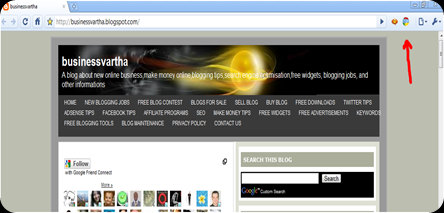
2. While the installation is going on the browser will ask for certain permissions about data that you are visiting a page. Once the installation is complete, then reopen the browser, and you can see a small tab, SEO on the right hand side corner of your browser. (Just look at the red arrow in the picture given below)

GOOGLE CHROME SEO EXTENSION

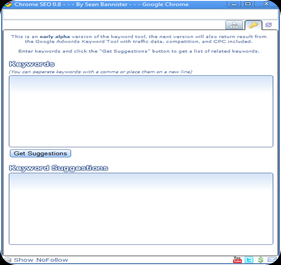
3. Now click on that “SEO” button. A popup will open that look like the one that given in the picture. You may enter the URL of your blog or website and click on “Go”. Within few seconds, you will get results about Search Engine Optimization Tools that can help you with Competitive Analysis, Keyword Research, Back link Checks, PageRank Checks and other daily SEO tasks.GOOGLE SEO

This Google Chrome extension receives information from various sources about the URL that you are analyzing through this toolMAjor sources include Archive.org, Alexa Rank, Compete Rank, CoralCDN, Ask, Baidu, Bing, Delicious, Digg, Dmoz, Google PageRank, MajesticSEO, Open Site Explorer, Quantcast, SEMRush, SEOmoz, Linkscape, StumbleUpon, Technorati, WebCite, Yandex Quotation Index, Yahoo.

4. Once you get the details about the URL you are analyzing, then plan your SEO activities, like link submission, and submit to other search engines. Later, do SEO analysis every week using this tool. Increase the number of back links and gain much higher page rank.

5. The Key word suggestion tool is another great feature of this extension. KEYWORDSYou may type some Keywords or the primary subject of your latest post in the first box. Then click on Get suggestions. You will get most popular keywords in the second box.

As an important way of Search Engine Optimization, it is better that you select some popular Keywords and focus more on them in that post.


Google is promising that this SEO extension will be under constant development to provide some great features like, integration with Google SERP, the ability to compare site ranking stats, side by side, Keyword Ranking Checker to check search rankings, On page Keyword Analysis, Integrate the Keyword Tool with the Google Adwords Keyword Tool to make keyword research faster, PPC Integration (Adwords, Adsense, Microsoft Adcenter, Yahoo Search Marketing), Support for Wolfram | Alpha, Better descriptions so any Web Designer / Developer can work with the tool, Google Analytics Integration, Google Chrome SEO Toolbar and allow Google Chrome SEO Add Ons so developers can contribute plugins.

So, what are you waiting for? Grab this extension and start your SEO ride.

Something to SEO:

Thursday, August 12, 2010

SEO FREE TOOL KIT FOR BLOGGERS

Search engine optimization or SEO is the most popular term in the blogging industry. A success  blogger always develop a perfect search engine optimization. In this post I would like to let you know about a Free SEO tool kit that will help you a lot to optimize your blog or website in an easy way. This free software can be installed in your computer and is absolutely free of charge.

This free software is very easy to use. Just go to this website and find the link to download. http://www.microsoft.com/web/seo/

SEO

After downloading, install it in your computer. If your computer doesn't have Microsoft Web Platform Installer, then you had to install it first and then install Free SEO Tool Kit using it. In most computers, both process will take place automatically. This Free SEO Tool Kit contains many tools that can be used according to your requirement. It can be downloaded from this link also. http://www.iis.net/download/SEOToolkit 

How Search Engine Optimization (SEO) Got Easy with Free SEO Tool Kit

IIS (Internet Information Services) SEO Toolkit

This Free SEO Tool Kit will help you to

  • Crawl a web site or blog
  • Analyze a web site or blog
  • Control how search engines access and display web content
  • Inform search engines about locations that are available for indexing
  • Manage the Robots.txt File
  • Manage Sitemap Files
  • Registering sitemaps with search engines
  • Improve the volume and quality of traffic to your web site from search engines
  • Improve Customer Experience

If you like to know more about the use of this software, then I suggest you to read

More to SEO:

Blog Widget by LinkWithin