Stop PC Crashes with WinZip System Utilities

Enter your email address:

Showing posts with label GOOGLE PLUS. Show all posts

Tuesday, November 15, 2011

SHARE YOUR POST FROM GOOGLE PLUS TO TWITTER

Do you like to know a strange and easy method to post from Google Plus to Twitter? This is bit funny, doesn’t require any verification from twitter. Hopes that you remember about our previous post on Auto post to Facebook using Google Plus. This is somewhat similar to that. For sharing a post from Google Plus to twitter, just follow the steps given below.

google plus twitter

How to update post from Google Plus to twitter

  • Login to your Twitter account.
  • Login using Twitter account in www.twittercounter.com
  • Then go to http://twittercounter.com/pages/twittermail#
  • Activate the Twittermail address and copy it.
  • Login to your Google Plus account
  • Create a new circle named “Twitter”
  • Add the Twittermail address to this new circle “Twitter”
  • While posting in Google plus, share the post with this circle (twitter)also.
Simple, isn’t it?

Thursday, November 3, 2011

CONNECT GOOGLE PLUS PROFILE WITH BLOGGER

How about replacing your Blogger profile with an exciting Google Plus profile. Bloggers who switch will automatically get access to the Google+ integrations in the future. This is a completely an optional feature because Google respects bloggers who are blogging under a pseudonym. We believe that in near future, linking your blogger profile to Google Plus will help to share your posts automatically. ( Remember using networkedblogs application in Facebook)

google plus blogger

How to connect with Blogger blogs with my existing Google Plus profile

If you already have a Google+ account and would like to replace or connect your Blogger profile with your Google+ profile, click here to get connected.

I have no Google Plus account. How I connect with my Blogger Profile

Create one Google Plus account. Click here to get a Google plus account. Then go to Draft blogger to get switched. Switch here

Quite easy, isn't it?

POST AND SHARE FROM GOOGLE PLUS TO FACEBOOK

A reader of my blog from Australia, requested me to give a trick to post in Facebook at the same time he post in Google Plus. He thanked me for helping him in adding all contacts from facebook to his Google Plus. Do you like to know how to bring your contacts from Facebook to Google Plus. Read this also. Well, here is some interesting steps to post from Google Plus to Facebook.

How to share and post from Google Plus to Facebook

  • Login to your Facebook account
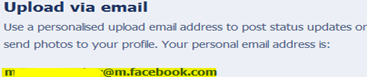
  • Go to http://www.facebook.com/mobile
  • Copy the email address shown there. (Look at the picture given below.)

email facebook

  • Login to your Google Plus and Create a new Circle named as "Facebook"
  • Add the above email address that you got from Facebook into the new circle “Facebook”
  • Now, whenever you post on Google Plus, share that post with this new circle also.

Simple, isn't it?

Wednesday, August 24, 2011

ADD FACEBOOK AND YAHOO FRIENDS TO GOOGLE PLUS IN FIVE MINUTES

This article will help you to add your Facebook friends to Google Plus. This require some easy steps to do and a Yahoo account. With the help of a Yahoo account, you can add your yahoo friends and Facebook friends at the same time. Simply follow the steps given below.

HOW TO ADD FACEBOOK  AND YAHOO FRIENDS TO GOOGLE PLUS

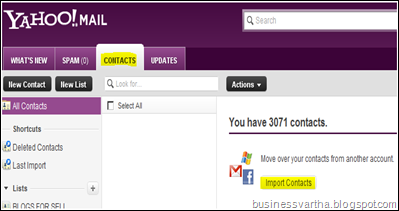
Step 1) Login to your Yahoo account and then go to Contacts tab and click on Import Contacts. (You can see a Facebook Icon/ Gmail Icon-look the picture given below)

 facebook import

Step 2) Select Facebook button and start importing all Facebook friends to your Yahoo account. If you already logged in to your Facebook account in the same browser, then importing will start automatically. Otherwise, when the login screen of Facebook appears, login with your username and password. After completion of importing, all your Facebook friends will be added to your Yahoo contacts. You can see that your number of contacts increased.

Step 3) Now again open Yahoo mail, CONTACTS tab.  Click on Actions. Select Export all. Export as Yahoo! CSV, and save it on your Desktop.

YAHOO MAIL EXPORT CONTACT

Step 4) Now login to your Google Plus account. Click on circles and then on “Find People”. Under that tab, click on “Upload Address Book”. Then select the Yahoo! CSV address book, that you have saved on your desktop as per Step 3.

GOOGLE PLUS ADD FACEBOOK


Step 5) Once the upload finished, you can see all those people are on the Circle dashboard. Click on each person and drag them to your desired circle. You can select many contacts at the same time and drag them on to your favorite circles.


Cool, isn’t it?


More to Read:

Monday, August 15, 2011

AUTOMATIC UPDATE SOCIAL NETWORKING SITES USING GOOGLE PLUS LINKS

Are you surprising, hearing that I am going to explain how to update your all social networking platforms using Google Plus. This is one of the most simple way to update your Facebook, Twitter, Digg and all other social networking accounts with the new post you have just blogged. But before doing that, you need an account in Posterous or ping.fm. Let me explain how can you do with Posterous or ping.fm

GOOGLE PLUS LINK UPDATION

  1. Create an account with Posterous or ping.fm
  2. Add most of the social networking allowed for auto post in Posterous or ping.fm
  3. Assign posting through Email. While creating the account, you will get a special Email address in Posterous or ping.fm
  4. Now login to your Google Plus account
  5. Create a new “Circle” and add the above Email address of your Posterous or Ping.fm account, to which you are allowed to send posts by Email.
  6. Now copy the link of your new post. Share it to this “Circle”. That’s all. Done.

What happens exactly when you share with Google plus circle

When you share with that circle, it will automatically send Email to your Posterous or ping.fm address, where autopost will happen to all your social networking sites linked with that account.

Nice Search Engine Optimization or Social Networking Optimization.

Quick, easy, isn't it?

More to Read:

Friday, July 1, 2011

GET GOOGLE PLUS AND CHALLENGE OTHER SOCIAL NETWORKS

Beware all Social Networks. Google is getting ready to launch its master networking site, “Google Plus”. Whether Google may be able to tackle the social networking monopoly of Facebook with its Google+. Lets wait and see. Google+ gets support from its Search Engine, Google Chat, Youtube, and many other Google's applications. At present Google+ is in limited Field Trial, testing with a small number of people.
GOOGLE PLUS

How To Sign Up For Google's Social Network, Google Plus, Google+

Very soon Google+ project is ready for everyone. Give your email address to Google Plus, Google+ and wait for the invitation. Click here to provide your Email.

What Google+(Google Plus) offers

  • Extreme privacy: Define your team to receive your updates. Google + offers its users to selectively share what you want, to whom you want.
  • Google+, Google Plus Profile: Show to the world, who you are .
  • Google+, Google Plus Sparks: Looks for videos and articles it thinks you’ll like.
  • Google+, Google Plus Circles: As Google say, circles makes it easy to put your friends from Saturday night in one circle, your parents in another, and your boss in a circle by himself, just like real life.
  • Google+, Google Plus Instant Upload: Yummy, your photos upload by themselves.
  • Google+, Google Plus Chat: One simple group chat.
  • Google+, Google Plus Video Chat : Drops by for a face-to-face-to-face chat.
  • Google+, Google Plus Stream : The real place to have meaningful conversations with the people you care about.
  • Google+, Google Plus Hangout : Hangouts lets you chill with friends that are scrolling through the web, allows to use live video chat that puts you in the same room together, and if you’re bored, start a hangout.

What we expect more from Google+ (Google Plus)

Besides above all these marvelous features, we need
  • A place to fix my Adsense account. ( Buddy, weak budget, let Adsense bless my Social Networking too)
  • A huge locked place to upload my files, ( yap , I mean personal files – No more space in my laptop)
Hopes that Google hearing this
More to Read:
Blog Widget by LinkWithin