Stop PC Crashes with WinZip System Utilities

Enter your email address:

Showing posts with label ADWORDS. Show all posts

Wednesday, June 22, 2011

DO YOU GET DIRECT ADS IN YOUR BLOG

Starting a blog was not only my hobby but also to make good money. Many of my friends suggested me to popularize and display direct ads. Even though my blog had some good quantity of visitors, direct advertisement was only one.I kept four 125×125 adslot on the sidebar and one banner slot open for direct ads. Many companies, persons, etc approached me asking about the rent for displaying ad for one year. At the beginning I provided high rates but later I came down even to 20 dollar per year for one 125×125 ad on the sidebar. No one was interested and I shifted my main income source to Google Adsense.(At last it worked, Adsense is paying me well)

DIRECT ADS

Why I am not getting direct ads?

  • May be my price is very high


  • The reach of my audience is very poor. This is because of my blog niche and targeted audience.


  • Most of the companies contacted me from Europe for direct ads, and my visitors were coming from India and USA.


  • My blogs PR may be less, than what the advertiser want.


  • When social networking became popular, most of the advertisers choose Facebook like programs to display ads.


  • Advertisers started depending on more reliable, sincere, fraud less programs like Google Adwords


  • Lack of own establishment including domain, because advertisers believe in established firms like news agencies websites, tv channels websites etc  

Are you getting direct ads?

There are many programs that sell direct ads. But most of them are not successful in finding direct advertisers. If you get direct ads, or know about any such programs that is very useful in collecting direct ads, then please let me know. I will write about it, so that other bloggers can also make money out of it.

More to Read:

Thursday, December 10, 2009

SEND YOUR PRODUCT IDEAS TO GOOGLE ADSENSE

Adsense is the most  popular PPC program among all bloggers due to its consistency, regular follow up, multiple options and customer support. Google is known to be recording and analyzing all sort of customer feedback. Even if it s a small blogger like me and you, they are hearing each word from us. According to my experience, Google consider their customers as KING. Adsense have been working on building features based on customer’s feedback both from advertisers and publishers.

Capture (4)Here is a chance for you to  tell Adsense about what's on your AdSense wish list for 2010. What features or product updates you would you like to see? You can submit  an idea for a brand new feature or just a small tweak that would simplify our work flow. We have heard many suggestions from many bloggers through these blogging days. Now its time for you to send those idea drops to Adsense and they will make it true.

Any blogger interested, may please sign in with your Google Account and submit your suggestion at the earliest in this .You can also look through all submitted ideas and vote on the ones you like.

Adsense will consider all top voted ideas and bring them to the AdSense Product Management team for review. This Ideas page will run through December 15, 2009 , so hurry up.

3,230 people have submitted 537 ideas and cast 30,907 votes till now. May be your idea can give a heavenly boost to all Adsense publishers and advertisers.

All the Best

BV team

Related Posts

Wednesday, April 22, 2009

GOOGLE ADWORDS TO ALL BLOGS

How to use ADWORD to make your blog a success

DONT FORGET TO GET A FREE E-BOOK on GOOGLE ADWORDS MADE EASY…….Read below to get the link
Search engines are a good way to bring free traffic to your website but most of the pages of your blog not have enough page rank in search engines like, Google and Yahoo. So what ever the keywords you add, these pages will never come to the top of a search result.So I suggest an easy way to bring traffic to your site through pay-per click advertising  (PPC)
Google Adwords is one of the most prominent among PPC. Another one is Yahoo Search Marketing.
Advantages of PPC by Google Adwords:

  • This is ideal for those who have marketing blogs, business blogs and who want to be famous within a short period of time.

  • Most websites and blogs are now following PPC because is it one of the most competitive method of promoting a website or a blog.

  • Your ads are displayed in the search engines according to what people are searching in search engines i.e. You will get more TARGETED visitors to your site.

  • You pay only for visitors that come to your site

  • You pay a certain amount "per click" on your ad. If nobody clicks on your ad, no need for you to pay.
AdWords offers two ways to target ads as given below
Keywords targeting
Keyword targeting in which advertisers select keywords that can trigger their ads to appear on Google search pages and on the Google content network.
Placements targeting
Placement can be an entire website, or it can be a subset of pages or ad units on a site, as defined by site's publisher. Placement targeting allows advertisers to choose individual sites in the Google content network where they'd like their ads to appear.
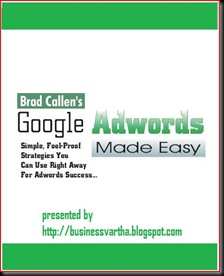
 Click here to download a FREE E book on

Capture

Setting up your AdWords account

clip_image002
Type www.adwords.com  in your browser The page will look like this and you may click on the  "Click to Begin" button to get started.


clip_image004
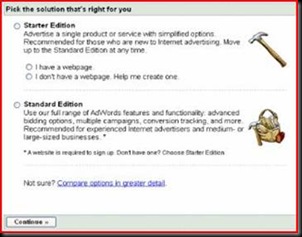
The next screen will give you an option between two types of accounts Starter and Standard. We are a beginner and just select Starter Edition. If you already have a webpage( hopes that most of us will select that) then click on “I have a webpage” and Continue


3
Now we will reach page as given here . First of all you need to build a webpage for your ad. Provide Basic information and all other relevant details and  continue


clip_image006
Here we will reach a page that shows what forms of payment your business accept through your blog or website. This is an optional one. If your blog is a service oriented one, then you can Continue without this option.


clip_image007
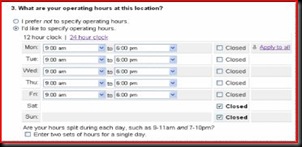
You may specify the operating hours of your business or just click “I prefer not to specify operating hours”


clip_image008
You can give a small description about your business in the next step.


clip_image009
Choose a layout and continue


You may preview your ad clip_image010webpage here. Or just continue


clip_image011
Now the screen will look like this.


clip_image012
Now you had to create the Ad. Here you had to target your ad, by selecting the customer location and language of the ad.


6
Here you will create or write your ad. You had to give the name of your website or blog and then create Text ads. All text ads contain a title, two lines of description and a URL. So describe your business so that visitors are get attracted to your blog or website, I mean love at first sight.


7
The most important part of ad writing is keyword choosing. Here you may choose and display the best keywords

 clip_image015
Here select a currency to pay for your ads and select a budget also.

  
clip_image016
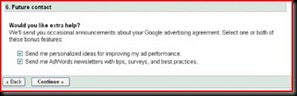
If you need some extra help from Adwords maximisation team, then click on both tabs and continue.
 clip_image017
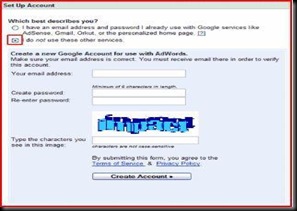
Now create your account by selecting the type of account you want to operate with Adwords.

  clip_image018


  Finally Click on create account
 clip_image019
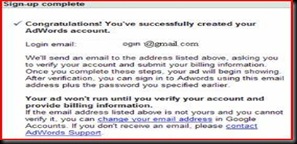
When the signup is correct, then the final page will look like this. An email from google also will come to your mail to verify the email id and to provide billing information.


How to Setup a Standard edition of Adwords:

Until now we saw how to setup starter edition. Now if you like to go with Standard edition, then Click here to download a FREE E book on
Capture
Blog Widget by LinkWithin