Stop PC Crashes with WinZip System Utilities

Enter your email address:

Wednesday, April 22, 2009

GOOGLE ADWORDS TO ALL BLOGS

How to use ADWORD to make your blog a success

DONT FORGET TO GET A FREE E-BOOK on GOOGLE ADWORDS MADE EASY…….Read below to get the link
Search engines are a good way to bring free traffic to your website but most of the pages of your blog not have enough page rank in search engines like, Google and Yahoo. So what ever the keywords you add, these pages will never come to the top of a search result.So I suggest an easy way to bring traffic to your site through pay-per click advertising  (PPC)
Google Adwords is one of the most prominent among PPC. Another one is Yahoo Search Marketing.
Advantages of PPC by Google Adwords:

  • This is ideal for those who have marketing blogs, business blogs and who want to be famous within a short period of time.

  • Most websites and blogs are now following PPC because is it one of the most competitive method of promoting a website or a blog.

  • Your ads are displayed in the search engines according to what people are searching in search engines i.e. You will get more TARGETED visitors to your site.

  • You pay only for visitors that come to your site

  • You pay a certain amount "per click" on your ad. If nobody clicks on your ad, no need for you to pay.
AdWords offers two ways to target ads as given below
Keywords targeting
Keyword targeting in which advertisers select keywords that can trigger their ads to appear on Google search pages and on the Google content network.
Placements targeting
Placement can be an entire website, or it can be a subset of pages or ad units on a site, as defined by site's publisher. Placement targeting allows advertisers to choose individual sites in the Google content network where they'd like their ads to appear.

 Click here to download a FREE E book on

Capture

Setting up your AdWords account

clip_image002
Type www.adwords.com  in your browser The page will look like this and you may click on the  "Click to Begin" button to get started.


clip_image004
The next screen will give you an option between two types of accounts Starter and Standard. We are a beginner and just select Starter Edition. If you already have a webpage( hopes that most of us will select that) then click on “I have a webpage” and Continue


3
Now we will reach page as given here . First of all you need to build a webpage for your ad. Provide Basic information and all other relevant details and  continue


clip_image006
Here we will reach a page that shows what forms of payment your business accept through your blog or website. This is an optional one. If your blog is a service oriented one, then you can Continue without this option.

clip_image007
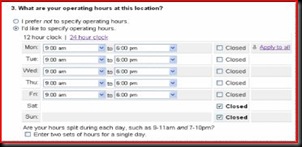
You may specify the operating hours of your business or just click “I prefer not to specify operating hours”


clip_image008
You can give a small description about your business in the next step.


clip_image009
Choose a layout and continue


You may preview your ad clip_image010webpage here. Or just continue


clip_image011
Now the screen will look like this.


clip_image012
Now you had to create the Ad. Here you had to target your ad, by selecting the customer location and language of the ad.


6
Here you will create or write your ad. You had to give the name of your website or blog and then create Text ads. All text ads contain a title, two lines of description and a URL. So describe your business so that visitors are get attracted to your blog or website, I mean love at first sight.


7
The most important part of ad writing is keyword choosing. Here you may choose and display the best keywords

 clip_image015
Here select a currency to pay for your ads and select a budget also.
  
clip_image016
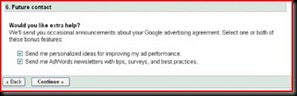
If you need some extra help from Adwords maximisation team, then click on both tabs and continue.
 clip_image017
Now create your account by selecting the type of account you want to operate with Adwords.


  clip_image018


  Finally Click on create account
 clip_image019
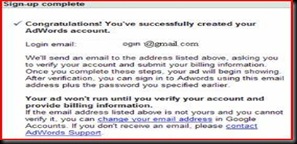
When the signup is correct, then the final page will look like this. An email from google also will come to your mail to verify the email id and to provide billing information.


How to Setup a Standard edition of Adwords:

Until now we saw how to setup starter edition. Now if you like to go with Standard edition, then Click here to download a FREE E book on
Capture

Tuesday, April 21, 2009

TAKE PART IN BLOGGERS CHOICE AWARDS2009 WITH YOUR FRIENDSTER, FACEBOOK,MYSPACE, HI5, OR ANY OTHER PERSONAL PROFILES

Think about Barak Obama or Britney Spears or Madonna or even David Beckam Voting your Profile. 

The time has come to Nominate your Friendster, Facebook, Hi5, or any other profile to Bloggers Choice Awards 2009. Oh, now you may wonder what is BCA2009! It is nothing but a popular website, where you can nominate your Friendster, Facebook, Orkut, Myspace or any other forum profiles ( even your blogs and websites ) in front of others to get Vote. If you are able to convince other participants to Vote for you, then you will be the winner. So I expect you to be the winner of 2009.

This is an important Search engine optimization technique, new online business, stock market information and blogging tips.

Why you Nominate your Profile?

You suggest or nominate either your or your friends profile for Voting under different categories. After signup in BCA2009, you can Nominate and Vote for other Nominations you like.

Nominating your profile in bloggerschoiceawards will help you to get introduced in a bigger platform.Many people will watch your profile and who knows, may be your profile will be the hottest one tomorrow.

You may invite your friends to vote for you by using a badge in your profile and thereby widen Vote from your audience.

You must visit other nominations and vote for them. In most cases they will visit you back to know who voted for them. This will bring more visitors to your profile( some of them will definitely like you).

A hidden love making technique, isn’t it?

How you Nominate your Profile?

Simply follow the below given Easy Steps

Step ACaptureww1

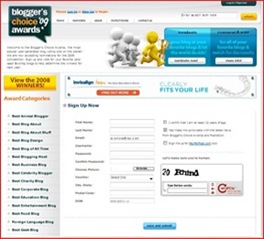
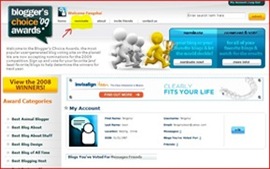
Type www.bloggerschoiceawards.com in your browser window and click on SIGNUP. The signup form will look like this .Provide a valid email. After filling up,save and submit. Don’t forget to put the two CAPTCHA words with space between them.

This

is an important Search engine optimization technique, new online business, stock market information and blogging tips.

Step BCapture21

After save and submit, you will get an email immediately that gives you username, password and a link to sign in again. The window will look like this

The best possible way of getting more traffic to your website is this.

Step C Capture111

Very Important Step

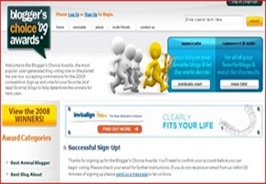
When you click the link from your email, then you will reach a page that shows you have successfully confirmed you account.

Include some keywords as well

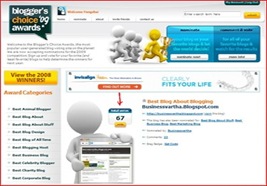
Now copy this link http://bloggerschoiceawards.com/blogs/show/69551 and paste in the same browser window. You will reach a page as shown above. Click on Yellow button image as shown above. and proceed to next step

This is an i

mportant Search engine optimization technique, new online business, stock market information and blogging tips.

Step DCapture4_thumb6

After clicking on Vote, now you can see a dark green tab on the right top corner of the page, “Nominate”. You can see that tab in the yellow highlighted area in the picture here. Now click on “Nominate” and proceed to Step E.

The best way to get a page rank above five is to include many meta tags as well

Step E Capture531

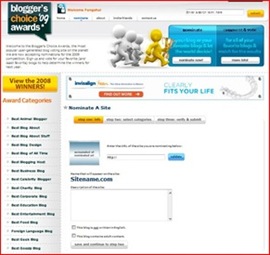
When you nominate your profile, as you can see in this, enter some details in “Step one: Info” .

Under the heading of “Nominate A Site”, you had to enter your PROFILE ADDRESS,description and check boxes if it is written in other languages or contain any adult content. Then save and continue to step two.

How to find the PROFILE ADDRESS

You can find the URL or the website address of your profile from your profile which will look like this: http://profiles.friendster.com/XXXXXXXX ( XXX is some numbers - for friendster profile). Similarly you can find the profile address of profiles in Orkut, Facebook etc ( this is your Nominating address)

Capture6_thumb7 In next step , you had to select the appropriate categories of your profile and enter tags for your blog. You may select up to four categories for a single profile. I recommend you to select only one category that will help you to concentrate while canvassing votes for you.You may select category of your profile.

Then save and continue to next step

A blog of business can hold any type of formulas to explore keywords

Capture7_thumb6

In this step, you can see the details you enter in step two then verify it , save and submit. You may see the screenshot of this in this picture.

Meta tags and keywords will help in search engine optimisation

Capture8_thumb5

If you have done everything perfectly, then you will get a message of Thank you for Nomination.

This is an important Search engine optimization technique, new online business, stock market information and blogging tips.

HOW TO GET A BADGE TO DISPLAY IN YOUR BLOG

Never break your head thinking much about this. Just comment on this Post with your profile address and I will publish your Profile name and BADGE in this website. Through this Badge your friends may vote for you

All the best……………Relax and have some snacks

Blog Widget by LinkWithin