Stop PC Crashes with WinZip System Utilities

Enter your email address:

Showing posts with label INDEX IN SEARCH ENGINES. Show all posts

Thursday, April 28, 2011

SEO STEPS TO WIN SEARCH ENGINE RANKINGS

Search Engines are built to help the searchers. Search Engines strive to put the best fit/standard websites on top rankings so that searchers get their required info within few clicks. How do Search Engines know a website’s standard and its relevance with searched keywords? What are the steps you should follow for a complete SEO to improve your website’s rankings?

This article covers Search Engine Optimization in two levels - the first is On-page optimization, and the next is Off-Page Optimization. An effective On-page optimization together with good Off-page optimization will improve your Search Engine Rankings.

SEO STEPS


On-Page Optimization

Define your Business& Target Audience - The first step in any business starts with analysis. Determine what kind of services your website is to provide and what kind of audience you want for your website?

Don’t Purchase a New Domain - If you already have a good domain name don’t try to purchase a new one, as some search engines look for the age of the website as a ranking factor.

Choosing your Domain Name - If you are planning for a new website, try to get a domain name with keywords included. If you target regional customers, you can have your domain based on the region, say for example .uk or .au or .in

Make your Website look Clean & Simple - Now you have a domain name and you know whom you want to target. Website design is the key factor which keeps your visitor to stay for a while in your website and navigate your services. Make sure your website design has a good feel & look, clean and simple.

Evaluate your Website - If you have an existing website, and now you want to do SEO for it, then evaluate your website:

Navigation structure - think in a visitor’s point of view - Can someone navigate and reach the product/services they are looking for? Make your navigation user friendly, no visitor should leave your website due to confused navigation.

  1. Check for W3 compatibility of your website.
  2. Check for any broken links in your website and fix if any.
  3. Your website should load fast so that it doesn’t check on your visitors’ patience.

Observe your competitor - Find your competitor websites. Analyze and gain knowledge on their tactics, the keywords they use, the techniques applied. With the help of this analysis you will learn what is working and what is not working, which will help in your SEO process.

Research on Keywords - List the Keywords your target audience would search for and the ones used by your competitors. Make use of keyword research tools like Overture to know more on your related search terms. Now refine your list and make your final list of target keywords.

Structure File name - If you have control over your file names - modify file names with your keywords included.

Search Engine Friendly Sitemap - A well structured search engine friendly sitemap can help Search Engines to index all your pages. With good anchor text for your navigation links you can improve your rankings

Write an Attractive Title - Why is your web page title so important? The web page title is displayed in SERPs which in turn help in attracting your visitors. Web searchers do their search with a term and look for titles in the result pages that best fit their search. Hence make your title attractive, with targeted keywords included. Try to incorporate related keywords too. For example you target for Montessori School, you can write title as ‘ Montessori School, the Preschool for your Children’. (in this way you add 2 related terms).

Meta Description Tag - Description tag is also displayed in snippets of any SERPs. This description helps to motivate searchers to visit your website. Make an effective and optimized description tag. Snippets are also taken from surrounding text of the searched keyword. You may need to edit your content a little to make your description look good.

Meta Keyword Tag - Though there is saying that Search Engines like Google doesn’t look for Meta keyword tag, there are some smaller search engines, which still follow the conventional way and spider the keywords tag. So there is no harm in making of the Meta keyword tags. Your meta keyword should contain keywords that appears in your body text.

Have Robot tags - If you don’t want any of your files of your website to be indexed, say an image or a text file, you can write your robot file insisting the search engines not to crawl those pages.

Alt Tags for images - As the name infers it acts as an alternate text for any image. This tag is both user friendly and search engine friendly. Search engines cannot read images; instead it indexes the alt tag given for any image and assumes it as the description for the image. This alt tag is not so important by Search Engines, as many spammers try to put irrelevant alt tag for the images to improve their rankings. However for an image link with a proper alt tag (keywords included) will work as great internal anchor link.

H1 & H2 heading format - Though no one is sure on whether this helps in rankings, try applying the header options, as this practice is good for any web development

Improve Keyword Prominence, Density & Proximity -Keyword prominence will increase if you have your keyword at the beginning of text part of your webpage. Keyword density refers to the ratio (percentage) of keywords contained within the total text content of the page. Keyword proximity refers to the closeness between two or more keywords. And this is yet another factor which has not much proven records but still exist in SEO practice.

Make Content look rich - As many SEO experts say content is the king. Optimized content with keywords included, along with other SEO factors working well the website can rank well in Search Engines

Keyword Rich Anchor Text - Anchor text for both internal links and external links is powerful element for Search Engine rankings. You can notice websites which doesn’t have the keyword in their web pages rank well which is all because of their anchor text of their inbound links.

Make Flash files work for you - Its better to avoid including flash files into your website. But under compelling circumstances, you can try adding keyword rich text somewhere in your file, since Search Engines like Google can index the text part of flash files

Bring your PDF files on SERPs - PDF file is a good source for keyword rich content. Most Search Engines can read & index PDF files and a few search engines shows PDF files in SERPs too. Make sure you have a good title and file name for your PDF file

Off-Page Optimization

Why Search Engines give so much of importance for inbound links?

It is easy for any website owner to optimize their website with good content, navigation, title, etc. But does that mean it’s a good website and people would love to check it out? Search Engines try to know and evaluate the standard of a website through many factors and the most significant of them is incoming/inbound links. When a website receives inbound links from related & standard websites, it obviously means that it is worth looking at. Search Engines learn about your website through inbound links and to be precise it’s through anchor text.

So natural linking with different & targeted keyword rich anchor text works great for any website. Here are a few ways to increase your inbound links/ backlinks.

Search Engines - Submit your website manually to search engines including regional search engines.

Directories - There are many directories available online for free submission. Submit your website into the category that best fits your services, most importantly with good anchor text. Try submitting in your own regional directories to improve your local business.

Forums - Participate in your industry related forums & discussion boards. Post your comments, thoughts and also provide a link to your website (without spam).

Blogs - Having your own official blog helps to post your company’s updates, product release, etc., and also inbound links. There are directories for submitting blogs. Submit your blog with proper keyword tags which helps in your blog listing.

Articles - Write keyword & content rich articles on your own and post in article junctions available online. There are article junctions which accept articles in HTML format, so you can include your links with good anchor text. Write fresh articles on your topic, post and see your traffic increasing.

Press Releases - You can post Press Releases, which also works like Article junctions & directories; however it should look more like a Press Release and not like an article.

Bookmarks - Social book marking - it serves two purposes: It gets you incoming links and it popularizes your website in your community. Make sure you put keyword rich tags for your bookmarks.

Classifieds - You can see some websites displaying free classifieds. You can put your advertisements there with link to your website.

This is a guest article from  Deepthi Kumar                                               Courtesy: http://www.useseo.com


More to read:

Thursday, March 17, 2011

CRAWLING, INDEXING AND SEARCH ENGINE RESULTS

Many new bloggers confuse themselves about various process that happens in Search Engine Optimization. Here in this post, we would like to explain about three terms, Crawling, Indexing and Search Engine Placements. This is primarily applicable to Google, but relatively adapted by other search engines also.  After reading about these three terms, you will understand how does Google or any other search engine find web pages matching your search query, and determine the order of search results.

What is Crawling?

crawling search engines

Crawling is the process by which the search engine arms go through a new website or blog once it gets a ping that the specific parent URL is updated. In case of Google, Crawling is a process in which Googlebot discovers new and updated pages to be added to the Google index by using a huge set of computers to "crawl" billions of pages on the web. Googlebot uses an algorithmic process in which computer programs determine which sites to crawl, how often, and how many pages to fetch from each site.

Frequency of Crawling:

Googlebot designs its crawl process depending on a list of web page URLs,based on the previous crawl processes. The Sitemap grabs the data provided at the webmasters tool page. When ever Googlebot visits each of these websites it detects links on each page and adds them to its list of pages to crawl. One of the main feature of Googlebot is that it lists new sites, changes to existing sites, and dead links. Also, Googlebot determines the content tags, photo tags, Title tags etc.

What is Indexing?

After crawling, Googlebot processes each of the pages it crawls in order to compile a massive index of all the words it crawls and the location on each page with keyword density, key content tags and attributes, such as Title tags and ALT attributes. The indexing then happens after identifying the density and relative importance of each Page.

How your Page appears in Search Engine Results?

While a person search a term in the search Engine, then say for example, Google  search the index for matching pages and return relevant results.In Google, “Relevancy” is determined by more than 200 factors like  PageRank. Build your site so that bots like, Googlebots can crawl, identify the  content keywords and rank it to the top of search engine results.

More to read:

Sunday, April 4, 2010

SUBMIT YOUR BLOG TO 51 SEARCH ENGINES

A quick way to submit your blog or website to prominent search engines like Google. Recently Google updated PageRank and many of our readers are well placed in PR. Now its your turn to increase the PR by submitting your blog to many search engines and grab higher PR. All of my readers please ping and invite search engines to your blog to notify them about the changes you have made recently. This invitation to search engines are quite easy and very effective search engine optimization technique. Here with providing a list of 51 search engines which you had to submit your URL for next crawl. This submission will definitely increase the number of visitors to your blog.  SEARCH ENGINES

From the below given list, just click on the links and provide the URL of your blog. Certain search engines request you to give a valid email for verification. It is better to provide a secondary email for this service. If you are managing a country targeted blog, then please select any one of the Google search engine according to the targeted region.

In the last two submissions( No.51 and 52), please change the URL of our blog with the URL of your blog or website and then submit it in your web browser.

  1. Acoon ( German Search Engine)
  2. Alexa web search
  3. Altavista.
  4. Amfibi 
  5. Anoox
  6. Arabji
  7. Artsearch
  8. Baidu (chinese search engine)
  9. Beamed
  10. Bestyellow
  11. Businessvartha
  12. Dinosearch
  13. Dmoz (Open Directory Project)
  14. EgyptSearch
  15. Entireweb
  16. Evisum
  17. Exactseek
  18. Exalead
  19. FindLaw
  20. FyberSearch
  21. Geoindex
  22. Gigablast
  23. Google
  24. Google Australia
  25. Google Blogsearch
  26. Google Canada
  27. Google Hongkong
  28. Google India
  29. Google Italy
  30. Google Romania
  31. Google SaudiArabia
  32. Google SouthAfrica
  33. Google Taiwan
  34. Google UK
  35. IntelSeek
  36. Jayde
  37. Microsoft Live Search
  38. Mixcat
  39. Scrub the web
  40. Search
  41. Searchsight
  42. Searchwarp
  43. Towersearch
  44. Unasked
  45. Walhello
  46. Websquash
  47. Whatuseek
  48. XtLinks
  49. Yahoo
  50. Yahoo!7
  51. http://submissions.ask.com/ping?sitemap=http://businessvartha.blogspot.com/rss.xml
  52. http://api.moreover.com/ping?u=http://businessvartha.blogspot.com/rss.xml

It is always better that you submit you blog or website in all these search engines. Please take care not to give repeated invitations or submissions to search engines in the same day itself. Also, as per our knowledge, submitting your URL to Google parent domain is enough to get listed in all other search engines.

Happy Blogging.

Further Readings:

Friday, August 28, 2009

ONE STEP FREE SUBMISSION OF BLOG OR WEBSITE TO 20 TOP SEARCH ENGINES

As a part of search engine optimization, I would like to remind all of my distinguished readers about the importance of submitting a blog or website to top search engines. Before submitting to Search engines, all of you should check that you have added meta tags properly to your blog.

Click  to know, how to Generate and Install  Meta Tags

Once you finish the installation of Metatags, follow the links given here and submit the URL of your blog, website or forums to these top search engines. I suggest all of my readers to do before the Page Rank update by Google, that may start soon.

I request my readers to kindly let me know if you have any previous issues related with such submissions. Also expecting your suggestions so that we can increase the number of search engines also.

ONE CLICK DIRECT SUBMISSION OF BLOG  OR WEBSITES TO SEARCH ENGINES

image  Submit URL of your blog or website to Google  by clicking  here and give your blog or website details. You may also add comments or keywords that describe the content of your page. ADD URL TO GOOGLE.COM

image Submit URL of your blog or website to Google Australia  by clicking  here .  ADD URL TO GOOGLE AUSTRALIA

image

  
Submit URL of your blog or website to Google Canada  by clicking  here .  ADD URL TO GOOGLE CANADA

image

  
Submit URL of your blog or website to Google Italy  by clicking  here . ADD URL TO GOOGLE ITALY

image

  
Submit URL of your blog or website to Google UK  by clicking  here . ADD URL TO GOOGLE UK

image  Generally MSN web crawler, MSNBot, can find most pages on the Internet. MSNBot follows links from your homepage to find other pages on your site. So just give your homepage URL in this link. ADD URL TO MSN or BING.

image Submit URL of your blog or website to Yahoo7 by clicking here. ADD URL TO YAHOO!7

image  You can submit your website, blog, Mobile sites, Media content, Search submit, Sponsored search, Product submit, Travel submit and Yahoo Directory submission here. ADD URL TO YAHOO

image You had to submit the sitemap to Ask.com and get indexed quickly. Open a new Browser window, Copy and paste the below given link. Don't forget to replace the “xxxxxxx” in red color with the name of your blog. Then Click enter. If you have correctly copied this link, then it will show “ Your Sitemap submission was successful ”
http://submissions.ask.com/ping?sitemap=http://xxxxxxx.blogspot.com/rss.xml

image Submit your Blog sitemap to Moreover.com.MSN will automatically crawl and index those submitted to Moreover.com

Open a new Browser window, Copy and paste the below given link. Don't forget to replace the “xxxxxxx” in red color with the name of your blog. Then Click enter. If you have correctly copied this link, then it will show “ Thank you for your ping. ”

http://api.moreover.com/ping?u=http://xxxxxxx.blogspot.com/rss.xml

image  It is very easy to submit your blog to Alexa for Crawl. Just click on this link and type the name of your blog at the end of the page and click “ Crawl My Site”. ADD URL TO ALEXA

image  You can submit your web site or blog to WhatUseek by filling out the form and  clicking on  "Submit URL" button. ADD URL TO WHATUSEEK

image Just click the given link to reach the submission Page of Official Search. ADD URL TO OFFICIAL SEARCH

image  Jayde.com is a B2B Search Engine, welcomes website submissions. Please enter your email address and site URL in the boxes given in this link and  then click on "Submit your Site". ADD URL TO JAYDE

image Blogsearch is Google service that helps to search blogs in blogosphere. Follow the link and submit. ADD URL TO GOOGLE BLOGSEARCH 

image  : You may submit your blog and website URL with Feed URL here. Just click on the link to reach the page. ADD URL TO WIL’S DOMAIN 

image  : Another blog directory and blog search engine. Just click on the picture and submit your blog in appropriate category. ADD URL TO LSBLOGS

image  Submit your URL to this Chinese Search Engine. Even though this is in Chinese language, but you may just enter the URL in the box provided, then enter English  Captcha and click on the button next to that. Click here to reach the submission page. ADD URL TO BAIDU.

 image  Submit a URL to AltaVista can be done by visiting the link given here. You may select this Yahoo supported URL submission from Search submit, express submit or basic submit. ADD URL TO ALTAVISTA.

 image Submit URL to Scrubtheweb here by clicking on the link. You may submit one URL per email address per day. An email confirmation will be sent to the email address after successful submission. ADD URL TO SCRUBTHEWEB.

 image  Submit your blog or website in this Dinosearch, Search engine made for Kids. ADD URL TO DINOSEARCH

image  Submit your blog’s and websites'  URL to Allestra here, but with Allestra's low cost one-time submission that provides your site with a lifetime listing. ADD URL TO ALLESTRA


Tuesday, June 23, 2009

SUBMIT A BLOG TO FREE ONLINE DIRECTORIES

Capture All of my distinguished readers should remember that submitting your blog / website to online Directories will improve the Page Rank of your blog/site. Achieving a higher Page Rank is a dream of every blogger/website owner. If the Page Rank is higher, then your blog will appear on top of the search engine results. Thus more visitors will come to your blog. Oh..you have started dreaming about huge traffic….

Be happy, read this article and try the software, absolutely free of charge. You can list your blog/website in 350 free online directories very quickly.

Free submission of blog or website to 350 online directories

I jumped with ecstasy when i got an email from Mr.. Brad Callen, announcing that his famous “Directory submitter” software has a Standard edition which is now absolutely free of charge.

Benefits of “Directory Submitter” Free Standard Edition

1. Submit your blog to 350 online directories absolutely free

2. Easy installation and execution

3. We can select the best directories depend upon the Ranking

4. One click submission

5. You can add different blogs, as separate “projects” and submit individually

6. Easy access of Directory main page down to the Software itself.

7. Improvement in Page Rank quickly

8. Option of upgrading the software and get submitted to more directories

How to Use “ Directory Submitter”

Step A

Click here to DOWNLOAD free copy of “ Directory Submitter” . Just put your First name, Email address ( don’t give your primary email in order to avoid spams. Instead, give an active less using email ) and Register. Now you have nothing to do in that Page, just view the ads and decide whether you need that products or not. Then you check your email and you will get a link to download it absolutely free of charge.

Double click on the file to Install it in your computer. Open the program after Installation

Step B

1

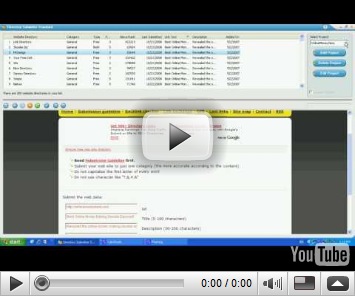
Once you open the program you can see the window looks like this.

Different directories are listed with their Page rank, Alexa rank etc.

On the right side you can see a button “ Add Project”. Click on that

Step C

Now a new window will open, where you had to give a name of your project (you can give any name as this is for persons who want to add more than one blog/site).

Then click “ Next”. Now another page, where you can give your personal details ( this is optional). So move to “Next”, again and you will reach a form where you had to fill

URL of your blog( start with http),

Category ( Put the appropriate Main category of your Blog ),

Sub Category ( Put the appropriate Subcategory of your blog),

Title, Description and Keyword ( give the exact keywords in your Meta Tag of HTML). Then click “Finish”.

Step D

Now double click on any of the Directory name inside the window. You can see the Directory Page get downloaded in the box below. You had to find ‘Submit the Link” button or similar one in that home page of that Directory. When you click on submit the link, then the details entered by you will automatically enter in the Submission form of Directory. Make any changes as you want and you may proceed further.

Different directories have their own style of submitting links.

a. Some of them may Accept links directly in a URL submission box on the front page of the directory

b. In some other,we had to select the Category and finally we can submit our URL

c. Some directories will request you to keep a back link on your blog. This can be done very easily.

Create a new post ( a Link Page) in your Blog with an old date. Then Copy and Paste the link( Reciprocal or Back link) of the Directory in your page and publish the post.

You had to give the URL ( webpage address) of that specific post ( page) in that Directory, before submitting your URL in the Directory. This will help the Directory to check whether you gave the reciprocal link of the Directory in your blog or not.

You can add as many as reciprocal links in that Link Page. Never add the URL of those Directory in your “blog list” or “link list” in the main Page, because this may negatively affect your Page Rank, if you have more outgoing links from your blog.

d. Certain directories gives the addition of a reciprocal link as an option only.

e. In some directories, the server is temporarily unable to accept your submission due to the “Directory site owner” reaching his/her bandwidth limit. In such cases,please try again later.

If you have any doubt, please fell free to ask me.

You may watch this Video for further understandings.

Related Posts:

1. SUBMIT YOUR ARTICLES FOR FREE

2. INDEX YOUR BLOG IN YAHOO IN FIVE MINUTES

3. SUCCESSFULL INDEXING IN SEARCH ENGINES

4. INDEX YOUR BLOG IN GOOLGE IN TEN MINUTES

5. SETUP GOOGLE ANALYTICS IN YOUR BLOG

Sunday, May 17, 2009

SUCCESSFUL INDEXING OF YOUR BLOG/WEB PAGE IN SEARCH ENGINES

All bloggers usually do many things to get indexed by search engines. They use many key words, some times use blackhat techniques like keyword stuffing, keyword hiding,content duplication etc. It is very important that each page or each post we write in a blog must be indexed in search engines. Indexing a page is an important step in successful Search Engine Optimization. Today I will discuss about three simple methods to index your page.( don't worry, I will bring more to you soon…). Believe me, these are extremely successful. Never think about an overnight jump in Page Rank, but over a period of time these methods will help you a lot.

Ways to improve performance and downloading time of your blog

INDEX A BLOG

These will help to Search Engine

Make a Crawl friendly Blog or Website by improving download time

You had to look very seriously to the design and downloading time of your website and blog. Usually  newer blog templates are made with  multiple frames, complex designs and Flash which delay the downloading time .

Why a blog or website to be downloaded quickly?

When we look to the crawl rate of most blogs, the spiders or robots from different search engines crawl a maximum of 40% and leave the pages immediately. This results in skipping the essential Keywords,resulting in poor Page Rank. Such sites will never come to the search results of a particular keyword.If the downloading time is less, then the Search engines crawl your sites more efficiently.

Majority of internet users in different countries especially developing countries ,using low bandwidth. So if the downloading time of our page is more than expected, then we will loose a wide audience from these places.

Always remember: “Design for Robots and Write for Humans

One more important factor we had to keep in mind that, If a new visitor can access you blog very quickly then he will spend more time in viewing your site. Such a visitor will never hesitate to come back to your blog.  Remember TIME IS PRECIOUS FOR EVERYONE.

How I know whether my blog have Crawl problems?

I have found a new solution for that. You can analyze the performance of your blog by using two simple Tools, One is A TIMER and other is A FREE CRAWL ANALYSIS FORMULA. You had to use both. ( click here to Download a Free Copy of Crawl Analysis formula. It is essential to download because it will find out whether there is any need of a  change for your webpage)

FIRST STEP:timer

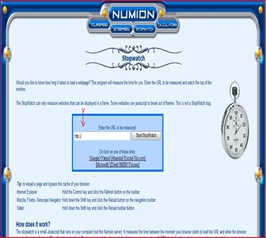
Just click here to check downloading of your blog/webpage with  TIMER . This will lead to a page where you just enter your website/blog/webpage address and click. Yourself can note down the time taken by site to get download fully. Now refresh again and note down the reloading time. Write the FIRST DOWNLOADING TIME ( in seconds) and RELOADING TIME (in seconds) separately in a paper. We will use this in next step.

SECOND STEP:formula

Now open the downloaded FREE CRAWL ANALYSIS FORMULA. As you can see here, it a simple excel based formula which you can download from here. It will tell you, whether you had to restructure your website or blog or not.

All that you had to do is  to enter the FIRST DOWNLOADING TIME ( in seconds) and RELOADING TIME (in seconds)  ( this you have noted in first step) in the space given in this excel sheet. You had to repeat the same in three different days. This will help to analyze in different downloading speeds. when you enter both data in the space provided and press enter, then in the last tab, it will show what you had to do with your webpage. As default, “ No Action Required” will appear in that space. If your webpage need any change, then it will show other wise “ No Action Required” will appear there.

How to Restructure your Webpage:

Consider these simple suggestions to restructure

1.  Avoid complex scripts in the webpage design.

2.  Use less advertisements slots.

3.  Reduce multiple frames in your blog

4. Using Basic Google Blogger templates in your blog is excellent for reducing downloading time. ( But Google Blogger templates not have Search Engine Optimized title tags in order to get higher rankings. So it is always advisable to change the title tags in the Google basic blogger templates. How to change the Title Tags in an ordinary Template to Search Engine Optimized title tags? Read this article and follow simple instructions)

5.  Avoid linking to Websites or Blogs that already block the crawling of Robots. Google Robots consider your webpage as a crawl blocking one , if your page already point towards a Robot blocking website.

6. Always reduce the total number of outgoing links from your page. Google Crawling is more successful in pages with less than 100 outgoing links. The total number of links include  the links from each advertisement slots also.

7. If all these efforts make no result, then consider changing your Template.

All the best.You may be interested to read :

INDEX A BLOG IN YAHOO WITHIN FIVE MINUTES

Easy Indexing of your Blog / WebPages in Yahoo within five minutes

Several readers appreciated our work in Indexing a blog in Google within Ten minutes and many of them email us asking about the ways to index their blog in another major search engine, Yahoo. As everyone knows, the indexing in search engines is an important step in Search Engine Optimisation. When your blog become more popular, this will help to get much better Page Rank . Your page will appear in first few pages of Search engine results related to specific Keywords in your Meta tags.Ultimately you will win in bringing more traffic to your pages.

All readers please excuse us, this time we are not providing any pictorial presentation( Mr Kris is much busy in repairing some famous blogs ) . So we go step by step.This will help to get Search Engine Optimization,blog promotion,more traffic,SEO, free tips,techniques and high rankings

Step A:

Create a Yahoo Email ID by visiting www.yahoo.com . Hopes that all of you have at least one Yahoo ID. So keep one ready with you and jump to Step B

Step B:

Go to Yahoo Site Explorer . Click on the 'Sign in' link which is at the top of the page. Now, ‘Sign In’ with your Yahoo Id and password that we have created in Step A. If you already have a Yahoo Account, then login with that.  After login, you will reach a page, where you can see a space provided for Adding your URL.

Step C:

Type the name (URL)of your blog in the box and click on the tab” Add My Site” . Now you can see that name( URL) of your blog or website will appear in a table on that page. Now click on the name of your blog or website which you submitted.

Step D:

When you click on the name (URL) of your blog, you will reach a page where you can see a tab “ Authenticate”. Authenticate is nothing but Verifying the ownership of your blog or website.

Here you can see, Yahoo will ask, “ How you Authenticate your site”? Click on “ By adding a Meta tag to my homepage”. Now you will get the Meta tag for authentication, which is given in bold letters, starting with <  and ending with >. Copy the META tag to Notepad . Don't close the window or don't logout.

Step E:

Now open another browser window and login to the Dashboard of your blog or website.For Blogspot users, ( others may directly go to EDIT HTML portion of their website) after login you will reach “Dash Board”, select “Layout” and then “Edit HTML”

This will bring you to the template code. First of all, download a copy of your TEMPLATE to your computer as a BACK UP. This will help you to retain your old settings and layout in case you make any mistake.

Copy the Meta tag from Notepad and paste it in your site's HTML in the first <head> section of the page, before the first <body> section.

When you look into the EDIT HTML section of your blog, you can see <head> portion within the first few lines and its better to paste the Meta tag just below  that.

Now save template and View Blog in a new Window.This will help to get Search Engine Optimization,blog promotion,more traffic,SEO, free tips,techniques and high rankings

Step F:

Now go back to STEP D and   click on the button “Ready to Authenticate”. Now you can see a message that your Site is verified. Some times,you will get a message saying that 'Your site is pending authentication' . Don’t worry, the verification may take sometime.

Step G:
Now Click on “My Sites” ( you can see this in the left top section of the page,under “Site Explorer” tab). Then click on your blog URL and you will reach a page where you can see Verification status of your blog.  In the same page, look to left side section, where you can see many tabs like,”Statistics”, “Crawl Errors”, “Feeds”,”Authentication” and “Actions”. 

Click on “Feeds” .

Here you had to give the Feed URL of your blog or your website.The below given is my Feed URL, you can make similar Feed URL by replacing the name of my blog.( by replacing the purple in color and bold)

http://businessvartha.blogspot.com/feeds/posts/default

Here your half job is already done. So just Type “ feeds/posts/default” in the space given after your URL and Click on “Add Feed”.

“DONE” .Check your account after few hours and feel happy that you have successfully submitted your site map to Yahoo. Also you can see any Crawl errors, Statistics of your blog etc.

Meanwhile,if you didn't submitted your blog sitemap to Google,please read this

INDEX YOUR BLOG PAGES IN GOOGLE WITHIN TEN MINUTES

Hope you may get some useful tips from below given posts.

1. ADD GOOGLE ANALYTIC TRACKING CODE TO YOUR BLOG

2. KEYWORD RESEARCH

3. NOMINATE YOUR BLOG FOR BLOGGERSCHOICE AWARDS2009

4. DOWNLOAD FREE EBOOK ON GOOGLE ADWORDS

Blog Widget by LinkWithin